Posts

Swap Ctrl and Capslock at system level

Edit file /etc/default/keyboard and append following option to  XKBOPTIONS. ctrl:swapcaps And run following command for changes to take affect. sudo dpkg-reconfigure keyboard-configuration Now accept the settings in the wizard and changes should take affect.

Writing telugu(transliteration) using ibus in ubuntu 12.10

Image
Ubuntu 12.10 uses ibus by default and scim is having some problems for telugu-rts(phonetic,transliteration typing). Other Indic scripts(Hindi, Tamil etc.) might have the same problem. For idiosyncrasies of working with indic transliteration, see this  explanation . The following procedure works for telugu-rts. $ sudo apt-get install ibus-m17n m17n-contrib $ im-switch Select ibus in the available input methods. Logout and login. ibus daemon should to be started(ps xa | grep ibus). $ ibus-setup In "Input Method" tab,  tick "Customize active input methods" In "Select an input method" drop-down, select Telegu -> rts(m17n) In some app(gedit etc. ), press ctrl+space(to select ibus) and start typing... à°ªంà°¡à°— à°šేà°¶ుà°•ో మరి paMDaga chESukO mari

tixati: what uTorrent should have been

Image
tixati is a cross platform (Linux, windows) torrent client with some good features. I am especially impressed with it's automatic bandwidth limiter (uTP). Also allows you to categorize torrents and manage transfers efficiently. It also provides deb packages and standalone executables and can run in portable mode. It lacks few features like remote control API and WebUI. But these things are in development queue. It looks promising and could become de facto BitTorrent client. Download tixati from following link. http://www.tixati.com/download/

apt-fast: Speedup ubuntu package downloads

apt-fast is a tool that allows you to download multiple packages at the same time. This speeds up installing/upgrading the packages. Execute following commands to add apt-fast ppa repository and install dependencies. sudo add-apt-repository ppa:apt-fast/stable sudo apt-get -y update sudo apt-get -y install apt-fast axel aria2 During installation choose either axel/aria2 for download manager and accept remaining defaults. From now on use apt-fast in place of apt-get in package management commands. 

Kernel with 200 line patch to improve responsiveness

Use following command to get new kernel version 2.6.37-8 with autogroup scheduler enabled. sudo add-apt-repository ppa:xorg-edgers/ppa sudo apt-get update sudo apt-get install linux-headers-2.6.37-8 linux-headers-2.6.37-8-generic linux-image-2.6.37-8-generic Source

Repo for installing latest version of nvidia drivers

Execute following commands to get latest version of nvidia drivers and have them automatically updaed. sudo add-apt-repository ppa:ubuntu-x-swat/x-updates sudo apt-get update sudo apt-get install nvidia-current

Install Firefox 4 beta

Execute following commands to install firefox 4 beta. sudo add-apt-repository ppa:ubuntu-mozilla-daily/ppa sudo apt-get update sudo apt-get -y install firefox-4.0 New features offered by Firefox 4 New Tab Location - Tabs are given top visual priority for more efficient and intuitive browsing. Switch to Tab - Navigate more easily by switching to open tabs from your Awesome Bar. Firefox Button - All your menu items are in a single button for easy access and reduced clutter. Apps Tab - Take sites you always keep open—like Web mail--off your tab bar and give them a permanent home in your browser.

One of the fix to speed up firefox response time

Get rid of YSlow addon. Atleast run it in another profile so that it won't interfere with your regular browsing.

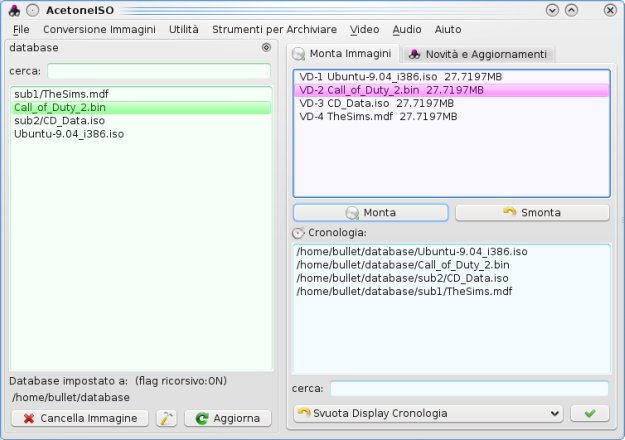
AcetoneISO - Daemon tools for ubuntu

Image
AcetoneISO allows you to mount/convert/extract NRG, ISO, DAA, BIN/CUE, DAT images. Install AcetoneISO

Download loki game installers

Available games ankh cube devastation docking station doom 3 enemy territory enemy territory: quake wars freespace glest heavy metal: fakk2 heroes of might and magic 3 jagged alliance 2 kingpin medal of honor neverwinter nights no gravity quake quake 2 quake 3 racer savage serious sam serious sam2 unreal tournament unreal tournament 2003 unreal tournament 2004 vegastrike Get lock installers for games .

Lucid Lynx Release Schedule

Event Date: Event Title: 12/10/2009 Alpha 1 01/14/2010 Alpha 2 02/25/2010 Alpha 3 03/18/2010 Beta 1 04/08/2010 Beta 2 04/22/2010 ReleaseCandidate 04/29/2010 Ubuntu 10.04 LTS

bisigi project - excellent ubuntu themes site.

Execute following command to setup bisigi ppa repo and install themes. sudo add-apt-repository ppa:bisigi sudo aptitude update sudo aptitude install bisigi-themes Get ubuntu themes at besigi project

Redshift xflux alternative

Get redshift .

Shortcut to add ppa repository

There is an easy command line way to add PPA repository and fetch GPG keys automatically. sudo add-apt-repository ppa:<repository-name> Replace repository name with relavent PPA repository. For example if you want to add and setup gpg keys for kubuntu-experimental execute following command. sudo add-apt-repository ppa:kubuntu-experimental

F.lux - Save your eyes

F.lux allows you to auto adjust lightening of you monitor to ease strain on your eyes. Download Linux version of F.lux . Usage xflux {-L <Latitue> | -z <zipcode>} Source: F.lux

moovida - A media center solution that won't allow you to watch movies.

I am not really a fan of media center software but I wanted to organize all of my media in one location and play them as I pleased. I installed elisa as I once tried beta version of it with it's impressive user interface animation capabilities. Weird but I don't see Elisa entry any where in Ubuntu menu. Package info showed it only contains documentation files and README revealed some off-world creature called moovida. The fun starts Started moovida and it showed some vertical areas divided into movies, videos, music, etc. Now all I have to do is add my USB drive to moovida so that it will show some play lists but I couldn't find any option. Instead it scanned some random locations and added some random videos to "Unclassified Videos" in Videos section and I throughly verified whether they are by mistake "Area-51 alien interrogation videos". I couldn't find any option that said add a folder or add file or anything that remotely implied "impo...

Fix unresponsive widgets in eclipse on ubuntu karmic

Execute following command before running eclipse. This bug affects wizards, button clicks, etc... export GDK_NATIVE_WINDOWS=1

apt-cacher-ng - chache deb packages and sources.

To this date installing apt-cacher-ng is the most simple way to setup apt proxy in ubuntu. Install apt-cacher-ng sudo apt-get -y install apt-cacher-ng Lets call the system which has apt-cacher-ng as server and other systems that are going to use this cache as client. After installing the apt-cacher-ng on the server you have to make sure server it self uses this apt-proxy. You can do this by creating a file called /etc/apt/apt.conf.d/01proxy and enter following line and save the file. Acquire::http { Proxy "http://127.0.0.1:3142"; }; Now open terminal in client systems and create the same /etc/apt/apt.conf.d/01proxy file and enter the following code and save the file. Acquire::http { Proxy "http://<server ip address>:3142"; }; Replace "&lt server ip address &gt" with real server ip address. That's it all your apt fetch and updates will go through your apt proxy and you will save tons of bandwidth if you have multiple...

nethogs - Monitoring per application bandwidth usage on ubuntu

nethogs allows you to see which application is consuming your network bandwidth. It has conventional interface like top command so lot of details about each process is displayed in tabular format. nethogs is available in ubuntu universe so no need of adding extra repo lines. Install nethogs sudo apt-get -y install nethogs Usage sudo nethogs <network interface name for eg: eth1>

SmarterFox : Imporove your browsing experience

Image
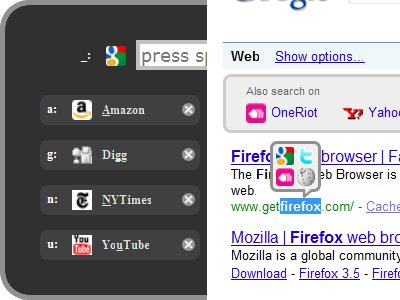
SmarterFox learns site pagination systems and allows you to view other pages without even a single click. These are the features offered by SmarterFox. SmarterFox makes your address bar smarter by integrating Google search with awesome bar(address bar). Save flash based content. There is a quick launcher which allows you to open your favorite sites. Search selected text in Google, Wikipedia and other sites.