Posts

Showing posts with the label multimedia

Play any Media file without any Restriction

Medibuntu is the place where you can get proprietary codecs for playing those unplayable media files in Ubuntu. Setup repositories Assuming you are using jaunty execute following command. sudo wget http://www.medibuntu.org/sources.list.d/jaunty.list --output-document=/etc/apt/sources.list.d/medibuntu.list If you are into intrepid use following command. sudo wget http://www.medibuntu.org/sources.list.d/intrepid.list --output-document=/etc/apt/sources.list.d/medibuntu.list Now install key and update your cache. sudo apt-get update && sudo apt-get install medibuntu-keyring && sudo apt-get update Make every DVD playable. Following command will allows your Ubuntu system to access discs protected using region codes. sudo apt-get install libdvdcss2 Make every exotic media file playable If you are using 32bit os then use following command. This will install w32codecs . sudo apt-get install w32codecs If you are on 64 bit system then use following command. Thi...

Elisa - Media Center for Ubuntu

Image
Elisa is a OpenGL powered media center solution for Linux and its also available on other platforms too. Elisa comes up with numerous plugins and features and competes with commercial quality software. Installation of Elisa sudo apt-get -y install elisa elisa Features Watch pictures, movies and video clips Play music with visualizations and automatically fetch album art from Internet. Tune into Internet radio stations. Supports vast number of audio and video codec's. Access Media servers located on LAN. Flickr & Youtube integration.

Rhythmbox as Media Server (UPnP/DLNA)

You can configure Rhythmbox to act as central media server using its built in plugin support. Using this ability you can access your media(music or videos) from remote location. Installation First you need to install python-coherence package. sudo apt-get -y install python-coherence Now open Rhythmbox >> Edit >> Plugins and check DLNA/UPnP sharing and control support . From now onwards when ever you start rhythmbox all of your UPnP compatiable devices and software applications will show the Rhythmbox served media server.

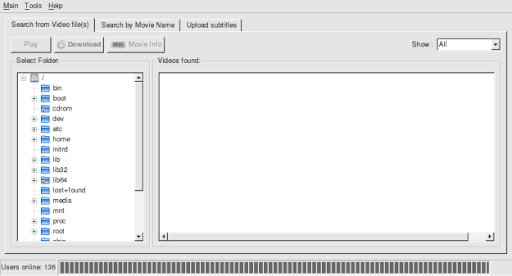
subdownloader - Download Subtitles

Image
Subdownloader 2.0 is one fine automatic subtitle downloader. Its written in QT4 using python and has very friendly user interface. Installation Subdownloader deb packages are not yet included in repo but you can download them from Subdownload 2.0 launchpad page . Download & save two deb packages subdownloader-cli-xxx_all.deb and subdownloader_xxx_all.deb packages to desktop. Now open terminal and change to Desktop directory and issue following command. sudo dpkg -i sub*.deb Apt will complain telling that you have some unmet dependencies and will exit. Execute following command to install those dependencies along with subdownloader. sudo apt-get -f install Usage Now launch subdownloader by issuing following command in terminal. subdownloader Now select directory that contains movies and subdownloader will automatically search for subtitles on net. Select the subtitles that you want and click Download button to start downloading subtitles. Enjoy.

Flash 10 for Ubuntu

Image
flashplugin-nonfree_10.0.1 packages are available in ubuntu multiverse. If you can't install them using apt-get then go to the link specified at the bottom of this article. Download the deb package and install it. Browse Flash 10 multiverse repository.