Posts

Showing posts with the label wine

Install Bleeding Edge Wine

Fortunately winehq maintains an ubuntu repo that contains deb packages of latest wine development releases. Presently the latest version is 1.1.4. This latest version contains cutting edge DirectX support and other improvements. Make a note that these deb packages may not be properly tested and you may face occasional breakage in functionality of wine. Installation Execute following command to add apt trust keys. wget -q http://wine.budgetdedicated.com/apt/387EE263.gpg -O- | sudo apt-key add - Execute following command to add new wine repository. sudo wget http://wine.budgetdedicated.com/apt/sources.list.d/hardy.list -O /etc/apt/sources.list.d/winehq.list Update apt sources. sudo apt-get update Now if wine is already installed then do an upgrade sudo apt-get -y upgrade Other wise install wine sudo apt-get -y install wine Check wine version by issuing following command. wine --version
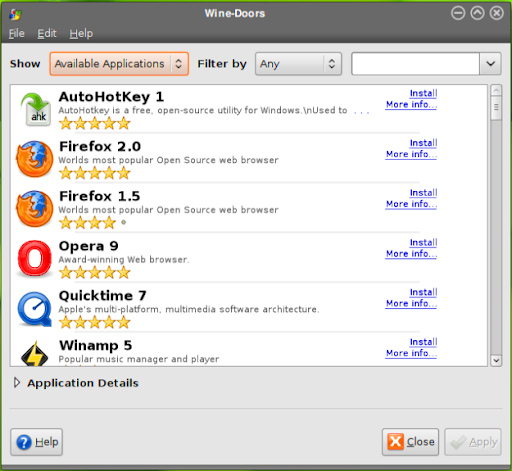
Wine Doors - Install Windows Applications

Image
Installation Garb Wine Doors deb package from wine-doors.org site download section . And save the deb file wine-doors _all.deb to into your download folder. Download should complete pretty quickly because package is very small. Execute following command from the download folder to install wine-doors deb package. sudo dpkg -i wine-doors*_all.deb Now start Wine Doors by clicking on Applications > System Tools > Wine Doors . Features Wine Doors provides a feature called bottles. Bottle concept is borrowed from crossover office a popular commercial alternative of wine. Where a bottle is an isolated environment in which you can run one or multiple windows applications without interfering with other bottles on the systems. Wine Doors has community that constantly tests existing windows applications for compatibility of wine and adds them to the Wine Doors repository. So these applications are available for you to be installed with a single click using synaptic package manager...

winetricks - install wine application perquisites with ease

As most of us know wine is used to run windows applications on linux. But setting it up always has been pain. For example if your windows program requires some prerequisites that aren't shipped or not implemented in wine then you have to go for hunting on net. Examples include mscore fonts, Internet Explorer, DCOM, etc. And this guide explains how to install winetricks on ubuntu. Crossover office has a little wizard that will download install all the prerequisites of a particular software but It costs money to use. But there is one little known tool called winetricks which you can use to automate that stuff for free. Finally you can concentrate on something productive rather than hunting for some obscure stuff. Download winetricks Use following commands to get winetricks and set it up. wget http://www.kegel.com/wine/winetricks chmod +x winetricks Using winetricks For example if you want to install Microsoft Core fonts use following command. ./winetricks corefonts ...