Posts

Showing posts with the label productivity tools

SmarterFox : Imporove your browsing experience
Image
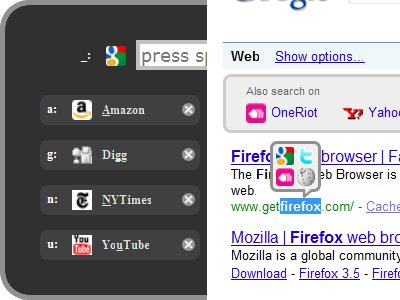
SmarterFox learns site pagination systems and allows you to view other pages without even a single click. These are the features offered by SmarterFox. SmarterFox makes your address bar smarter by integrating Google search with awesome bar(address bar). Save flash based content. There is a quick launcher which allows you to open your favorite sites. Search selected text in Google, Wikipedia and other sites.
Vim key bindings for gedit

There is a plugin called vigedit which provides vi emulation for gedit. First execute following command to checkout the source from bazaar repo. bzr branch http://bazaar.launchpad.net/~tristil/vigedit/main-method Now go inside main-method folder and execute following command. python install.py Now open your gedit and goto Edit > Preferences > Plugins and check vigedit. Your gedit will turn into basic vi editor.

Windows key as shortcut in gnome keyboard shortcuts

Image
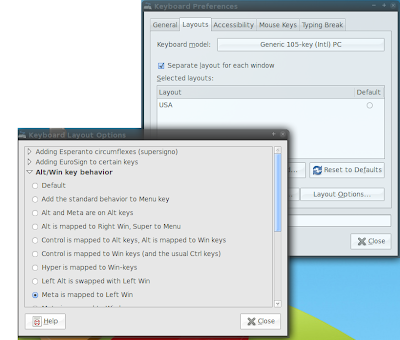
Ever tried using win key( super ,meta) as shortcut in gnome keyboard shortcuts? It will take it as super-key and not modifier. Do the following to use win/super/meta/mod4(different names for same key btw) for shortcuts in gnome. Change Win key behaviour in gnome. Select "Alt/Win key behaviour" by selection doing selecting following actions. Select "Meta is mapped to Left Win" from the list. preferences -> keyboard -> layouts(tab) -> Layout Options(button) -> Alt/Win key behaviour(dropdown list item) Now select "preferences -> keyboard shortcuts " and select the action you want to change and press win+key as you do normally. You will see Mod4+key . And it works now :)

Multi touch for any,all synaptics touchpad

Multi-touch became trendy after iphone came up with it. We are seeing many new laptops with multi-touch. At hardware level, there is nothing special that you need, to make multi-touch work. You can also do two-finger scroll and two-finger tap to right/middle click. Also, three-finger tap, but, for me it is very hard to press three fingers at the same time(1 out of 10). Create new file gksudo gedit /etc/hal/fdi/policy/11-x11-synaptics.fdi Paste the following code into the file and save it. <?xml version="1.0" encoding="ISO-8859-1"?> <deviceinfo version="0.2"> <device> <match key="info.capabilities" contains="input.touchpad"> <merge key="input.x11_driver" type="string">synaptics</merge> <merge key="input.x11_options.SHMConfig" type="string">On</merge> <merge key="input.x11_options.EmulateTwoFingerMinZ" ...

Get Awesome

Add following line to your /etc/apt/sources.list deb http://ppa.launchpad.net/saispo/ubuntu/ intrepid main Do an update and apt-get awesome to install or to upgrade. sudo apt-get update sudo apt-get -y install awesome You will get latest version of awesome window manager that is far more newer than the one in official repo.

BluePad - Remote Control Your PC From Your Cell Phone

BluePad allows you to remote control movie and music players on your PC from your Cell Phone. These are the some of the features offered by remote pad. Simulate game pad. Remote control presentations Customizable key mapping. Available in half a dozen languages. Get Blue Pad for Ubuntu

Project Hamster - Track Your Time

Image
Installation sudo apt-get -y install hamster-applet Add this applet to one of your gnome dock panel and start using it.

atool - Universal Tool to Handle Any Kind of Archive

There are numerous archive types tar.bz, tar.bz2, zip, rar, etc... And most of the time it is impossible to remember every conceivable option out there. By using a tool like atool you just have to remember things specific to atool and let the atool handle remaining details. aunpack - To extract files from an archive. apack - To create an archive. als - To list files in an archive. acat - To extract contents to standard output. adiff - To display differences between two archives. arepack - To convert an archive from one format to another. Installation sudo apt-get -y install atool

DapperFox - Custom RSS Feeds

DapperFox allows you to create RSS feeds from sites which won't offer any RSS feeds. You can even customize existing feeds and share feeds with the members of the dapper community. Get DapperFox Firefox Extension

PPA for OpenOffice.org 3.0

For Intrepid deb http://ppa.launchpad.net/openoffice-pkgs/ubuntu intrepid main deb-src http://ppa.launchpad.net/openoffice-pkgs/ubuntu intrepid main For hardy deb http://ppa.launchpad.net/openoffice-pkgs/ubuntu hardy main deb-src http://ppa.launchpad.net/openoffice-pkgs/ubuntu hardy main Download OpenOffice 3.0 Another way is to directly download relevant OpenOffice 3.0 binary deb archive from this download page and install it. Make sure you uninstall previous version of OpenOffice before installing newer one.

okular - Universal Document Reader

Image
Orkular is a KDE application with the goal of universal reader. It supports following formats. PDF PS TIFF CHM DjVu Images DVI XPS ODT Fiction Book Comic Book Plucker EPub Detailed format support matrix here. Home page of Okular .

conduit - Sync Your World

Image
Conduit is a simple synchronization tool for gnome. You can synchronize videos, photos, mails, notes, calendar data, etc to another computer or to an online service or to your personal device. You can access following services through Conduit. Youtube Flickr Box.net facebook f-spot tomboy And many more You can use following devices as targets Another gnome system A Mobile phone A Nokia 770/880 A plam or windows mobile pc. Or an iPod. Similar projects OpenSync Conduit screencast . Goto Conduit Project site.